
With Unlock Anywhere®, a lost, stolen or withheld Windows device can be locked from the cloud in seconds, and wiped for good when it is not coming back.
When the device is gone, the data must not follow
A lost laptop costs a few hundred euros to replace. The data on it can cost far more: customer records, project files, credentials and intellectual property. Laptops are left behind in taxis, trains and hotel rooms, or stolen from cars and offices, every day.
Not every risk comes from strangers. When an employee leaves on bad terms, a device may simply never come back, or it is reported lost while it is still in use. For companies with remote teams in several countries, collecting hardware is often slow or impossible.
Remote Lock and Remote Wipe give IT a way to act in all of these cases: from the Unlock Anywhere® Cloud Console, without physical access to the device.
Why encryption alone is not enough
Microsoft BitLocker encrypts the entire drive, which is an excellent foundation. In the common TPM-only setup, however, the device unlocks itself automatically whenever it starts on its original hardware. Whoever holds the device can boot it up to the Windows logon screen, with the encrypted drive already unlocked behind it.
That leaves the whole device exposed to password guessing, social engineering and hardware attacks on a running system. A pre-boot PIN adds protection, but it is one more secret for users to remember and for the helpdesk to reset.
Most importantly, once a device has left the company’s hands, standard BitLocker offers no central way to take back control. The key sits on the device, and the device is gone.
How Remote Lock works
Unlock Anywhere® adds a network-based protector to BitLocker. At every start, the device asks the Unlock Anywhere® Cloud Service for its cryptographic boot key. BitLocker unlocks only when the company has authorized that device.
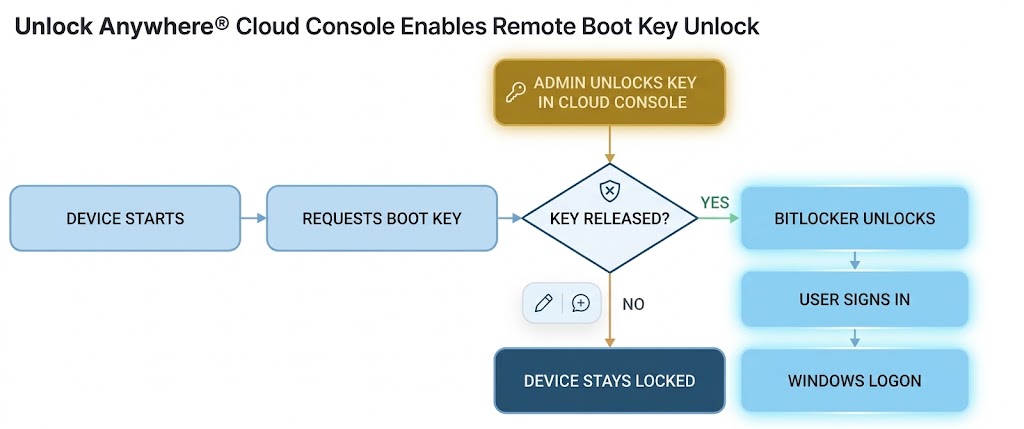
To lock a device, an administrator blocks its boot key in the Cloud Console with a single click. From the next start on, the request is refused and BitLocker stays locked. Windows never loads, so there is no logon screen to attack.
Offline starts are covered as well. Normally, a user without a network connection scans a QR code and receives a one-time boot code. For a blocked device, no code is issued. The TPM’s anti-hammering protection throttles any attempt to guess or tamper with the key.
If the laptop turns up again, the helpdesk simply releases the key. The user carries on as before, with no reinstallation and no data lost.
Remote Wipe: making the data unreadable for good
Some devices are not coming back. Remote Wipe turns a temporary lock into a permanent one.
Because the drive is fully encrypted, the data is only as readable as its keys. A remote wipe permanently revokes the device’s cryptographic keys in the Unlock Anywhere® Cloud Service, including the escrowed BitLocker recovery key. Without them, the data on the disk is irreversibly unreadable, a so-called cryptographic wipe.
The device does not need to come back online, and no one needs physical access to it. This makes Remote Wipe the right step for devices that are confirmed lost, stolen, or due for secure disposal.
Remote Lock is reversible and Remote Wipe is not. Most organizations lock first, and wipe once they are sure the device is gone.
Four situations where it counts
A consultant reports a missing laptop from the airport. The helpdesk blocks the boot key within minutes. Whoever finds the device holds encrypted hardware that will not start. If it is handed in at the lost-and-found, the key is released again.
Trust can end before an employment contract does. If a departing employee does not return a device, or claims it is lost, IT locks it out. Locally stored customer data and project files stay out of reach, even for someone who knows the Windows password.
When staff cross borders with sensitive data, the boot key can be suspended for the journey. A device inspected at the border cannot be started. Once the traveller arrives, the key is released and the device boots normally.
Old devices go to recyclers, resellers or leasing companies. A remote wipe before handover ensures that no readable data leaves the company, without relying on manual disk wiping.
Documented control for GDPR, NIS-2 and ISO 27001
Regulators and auditors want more than good intentions; they want proof. Every lock, release and wipe is recorded in the Unlock Anywhere® audit trail, together with every Windows start. The Compliance Dashboard shows at a glance which devices are encrypted, protected and locked.
| Requirement | How Remote Lock and Remote Wipe help |
|---|---|
| GDPR, Art. 32 and 34 | Encrypted data that cannot be unlocked is unintelligible to third parties, which can reduce notification duties after a device loss. |
| NIS-2, Art. 21 | Supports the required policies on cryptography and encryption, access control and incident handling. |
| ISO 27001, A.8.1 and A.8.24 | Protects user endpoint devices and enforces the use of cryptography. |
| ISO 27001, A.5.11 and A.7.14 | Covers unreturned assets and the secure disposal or re-use of equipment. |
Whether a specific incident must be reported always depends on the individual case, so involve your data protection officer.
Stay in control, wherever your devices are
Devices get lost, people leave, and hardware reaches the end of its life. With Remote Lock and Remote Wipe, your company decides whether a device starts and whether its data stays readable, not whoever happens to hold it.
Unlock Anywhere® works with the BitLocker and TPM 2.0 already built into Windows Professional and higher. No extra hardware and no Microsoft 365 subscription are needed.
To evaluate Remote Lock and Remote Wipe in your staging environment, sign up for a 45-day evaluation for up to 5 clients.