
As recently disclosed, there is a new attack on Microsoft BitLocker called YellowKey. The YellowKey attack refers to a vulnerability (zero-day exploit) in Windows 11 as well as Windows Server 2022 and 2025, which was published in May 2026. It allows an attacker with physical access to a device to completely bypass Microsoft BitLocker drive encryption and gain direct access to the data.
The YellowKey BitLocker bypass exploits the Windows recovery mechanism, which makes changes to file systems based on NTFS transactions. This boots into an environment that is launched after the BitLocker key has been recovered from the TPM, thereby granting access to the encrypted system partition.
The attack affects both the “TPM Only” mode and the “TPM + PIN” mode (provided the PIN is known to the attacker) of Microsoft BitLocker, and it can be carried out entirely without technical prior knowledge. The attack takes only a few minutes and leaves no traces on the system.
🗝️
How the Attack Works
The core of the attack exploits a vulnerability in the way the Windows Recovery Environment (WinRE) handles transaction files on storage media.
In simplified terms, the process is as follows:
- Physical Access & Prepared Medium: The attacker requires physical access to the locked or powered-off computer. They plug in a USB flash drive containing a specially prepared system folder (specifically, a manipulated FsTx folder within the System Volume Information directory).
- Booting into the Recovery Environment: The system is restarted and intentionally booted into the Windows Recovery Environment (WinRE).
- Automatic Unlocking by the TPM Chip: In standard BitLocker installations, the drive is automatically decrypted during bootup by the computer’s TPM (Trusted Platform Module) chip before a user even needs to log in. This means that as soon as WinRE is loaded, the BitLocker key is already in the system memory (RAM), and the drive is transparently decrypted in the background.
- Exploiting the Flaw (The Exploit): Upon startup, WinRE processes the manipulated FsTx files (Transactional NTFS bits) from the USB flash drive. Independent security researchers (such as Will Dormann) discovered that a logic error when reading this data can trick WinRE into manipulating or deleting system-critical boot files on another drive (the actual WinRE image X:). Specifically, the winpeshl.ini file is bypassed/disabled.
- Gaining the Root Shell: Because the control file has been bypassed, WinRE falls back to a default behavior: it opens a command prompt (cmd.exe) with full system rights (SYSTEM privileges) instead.
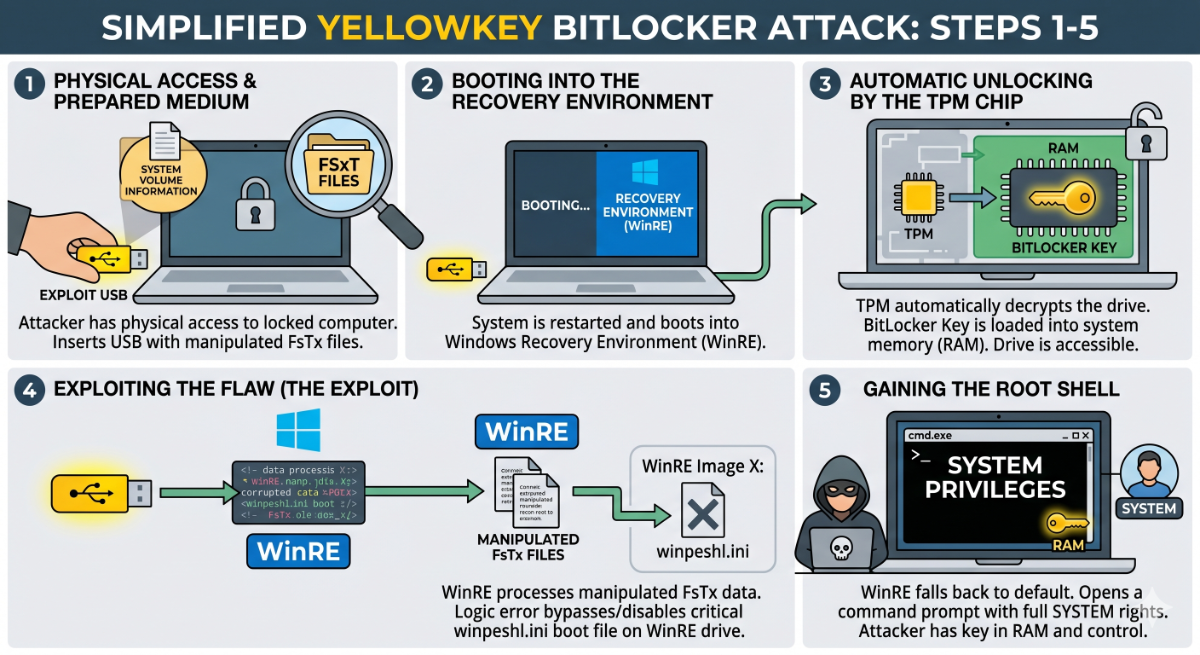
The Result: The attacker is presented with a command prompt, has unrestricted access to all files that were supposedly encrypted by BitLocker, and can steal data or install malware. After execution, the exploit even deletes the manipulated files on the USB drive automatically to wipe any traces.
The attack was published on GitHub by a security researcher under the pseudonyms “Chaotic Eclipse” and “Nightmare-Eclipse”.
Why Is This So Dangerous?
Previous attacks on BitLocker (such as sniffing the encryption keys directly from the motherboard traces using logic analyzers) required expensive specialized hardware, deep electronics expertise, and significant preparation time. YellowKey lowers the barrier drastically: all it takes is a simple USB drive and the knowledge of how to force a system into recovery mode.
Windows 11, Windows Server 2022, and Windows Server 2025 are affected.
How to Protect Against YellowKey
Since this is a newly discovered vulnerability for which Microsoft has not yet provided an official patch shortly after its release, administrators and users must rely on existing defense mechanisms:
- Activating the BitLocker (TPM) PIN only offers limited protection, specifically against external attackers who do not know the PIN. Internal attackers who possess knowledge of the PIN can still use the YellowKey attack to read or manipulate any information, compromise confidential configurations, and potentially escalate their privileges.
- In high-security environments, the recovery environment (WinRE) can be temporarily disabled completely (using the command reagentc /disable) until Microsoft releases a security update.
- Implementing Unlock Anywhere® or another Pre-Boot Authentication (PBA) solution for BitLocker reliably protects against YellowKey, as well as against other attacks like TPM sniffing or BitUnlocker.
Insights on BitLocker Encryption
Warning: BitLocker with TPM-Only protection is not a Pre-Boot Authentication!
In this default, the BitLocker key is read automatically from the TPM without any user interaction. Without pre-boot protection, attackers can bypass BitLocker via 🔓 BitUnlocker or use the 🗝️ YellowKey attack to bypass BitLocker encryption. Many other BitLocker attacks were published in the last years, like Cold-Boot attack. DMA-attack, TPM-Sniffing and Bitpixie. Please consider the use of pre-boot protection like Unlock Anywhere® to avoid current and future BitLocker vulnerabilities!